 Universal Display Magnet
Universal Display Magnet
Snap your displaysand they stay put.
Snap your Mac’s monitors together, arrange Universal Control across two Macs, and bring every window back where it was.


Overview
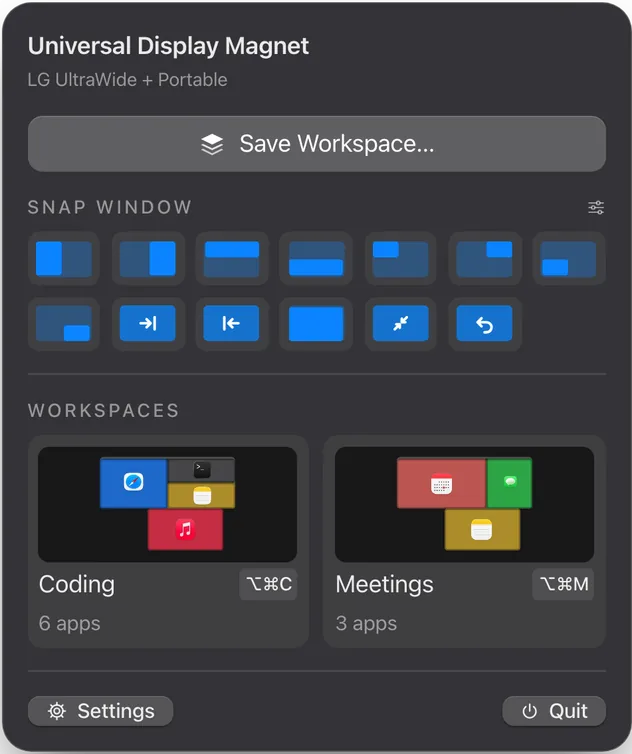
macOS shuffles displays when they wake and piles windows onto whatever screen is left. Universal Display Magnet fixes the arrangement once and puts it back every time: monitors snap edge to edge, Universal Control is arranged properly across two Macs, and workspaces return every window to its monitor and Desktop.

What it does.
Displays that snap
Drag displays in a visual editor and they snap flush, edges and centers lined up, or pull everything together in one click.
Stays put
Each set of monitors keeps its arrangement and gets it back whenever the displays reconnect, wake or get shuffled.
Universal Control
See both Macs' displays where Universal Control has them and drag them flush across both, applied live with an undo.
Workspaces
Save every app’s windows with their monitor, Desktop and position, and restore them in one go from a shortcut.
Window snapping
Halves, quarters, maximize, center and the next display from the keyboard, or drag a window to an edge.
Sync between Macs
Arrangements and workspaces sync directly over Wi-Fi, Ethernet or Thunderbolt, encrypted, with nothing to pair.
Tech specs.
- Price
- FreeA free download, notarized by Apple.
- Works with
- Multiple displays and Universal Control
- Requirements
- macOS 14 Sonoma or later
- Processors
- Apple silicon and Intel (universal)
- Languages
- 18 languages
- Latest version
- 0.2.5Released October 23, 2026
- Built with
- Swift and SwiftUI
- Privacy
- No account, no cloud service, no analytics. Sync between your Macs is direct and encrypted.
- Source code
- MIT license
Independent software, not affiliated with or endorsed by Apple.
More from Fancy Mechanisms.
 $9.99AudioOpen Sound ConnectNoise control, equalizer and scenes for Sony 1000X headphones, right from the Mac menu bar.Learn more about Open Sound Connect
 $9.993D printingBambu BarPrint progress, time left, temperatures and AMS filament for Bambu Lab printers, in the Mac menu bar.Learn more about Bambu Bar
 Coming soonScreen recordingFrameloA screen recorder and editor that adds zooms on your clicks, a smooth cursor and a polished frame for you.Take a first look about Framelo
 Coming soonFile transferBucketA fast, native file transfer app for SFTP, FTP, Amazon S3 and WebDAV, with a real transfer queue.Take a first look about Bucket