 Bambu Bar
Bambu Bar
Your Bambu Lab printer,one click away.
Print progress, time left, temperatures and AMS filament for Bambu Lab printers, in the Mac menu bar.

Overview
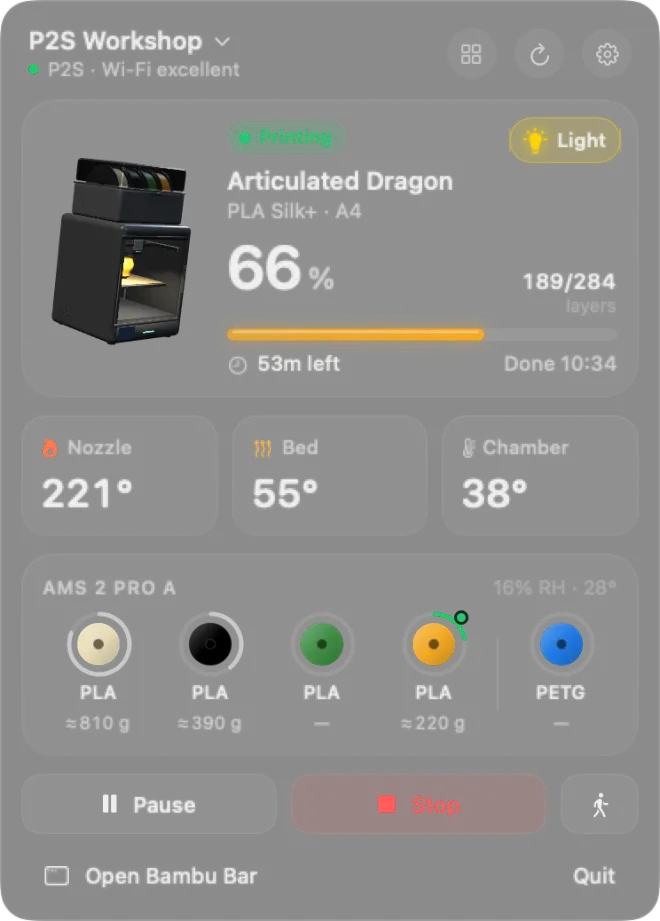
Bambu Bar keeps the answer in the menu bar: 66% · 53m. Click it and a panel shows the job, the stage, temperatures, the spool in use and how much filament is left, with pause, stop and the chamber light. It talks to your printers over your own network, the way Bambu Studio does in LAN mode, while they stay bound to your Bambu account.

What it does.
Progress in the menu bar
A printer glyph that fills as the print grows, with the percentage and time left beside it, and a mark when the printer needs you.
Everything at a glance
The job and its stage, layers, finish time, nozzle, bed and chamber temperatures, and printer errors in plain words.
Filament in grams
Bambu Lab spools report their weight, so you see ≈ 810 g left, by color name, along with the humidity in your AMS.
Controls
Pause, resume and stop, print speed from Silent to Ludicrous, and the chamber light. Bambu Lab allows print controls in LAN Only mode with Developer Mode on.
Every printer
Watch the whole farm at once, sorted with the ones that need you first, then by soonest finish.
Desktop widgets
Small, medium and large widgets, one per printer if you like, counting down between updates.
Tech specs.
- Price
- $9.99A one-time $9.99 purchase from the website, which also turns on automatic updates. Coming soon to the Mac App Store.
- Works with
- Bambu Lab 3D printers
- Requirements
- macOS 26 Tahoe or later
- Processors
- Apple silicon and Intel
- Languages
- 18 languages
- Latest version
- 1.5.0Released October 26, 2026
- Built with
- Swift and SwiftUI
- Privacy
- Printer data stays on your network. No app analytics, no tracking.
- Source code
- MIT license
Independent software, not affiliated with or endorsed by Bambu Lab.
More from Fancy Mechanisms.
 $9.99AudioOpen Sound ConnectNoise control, equalizer and scenes for Sony 1000X headphones, right from the Mac menu bar.Learn more about Open Sound Connect
 FreeDisplays and windowsUniversal Display MagnetSnap your Mac’s monitors together, arrange Universal Control across two Macs, and bring every window back where it was.Learn more about Universal Display Magnet
 Coming soonScreen recordingFrameloA screen recorder and editor that adds zooms on your clicks, a smooth cursor and a polished frame for you.Take a first look about Framelo
 Coming soonFile transferBucketA fast, native file transfer app for SFTP, FTP, Amazon S3 and WebDAV, with a real transfer queue.Take a first look about Bucket